


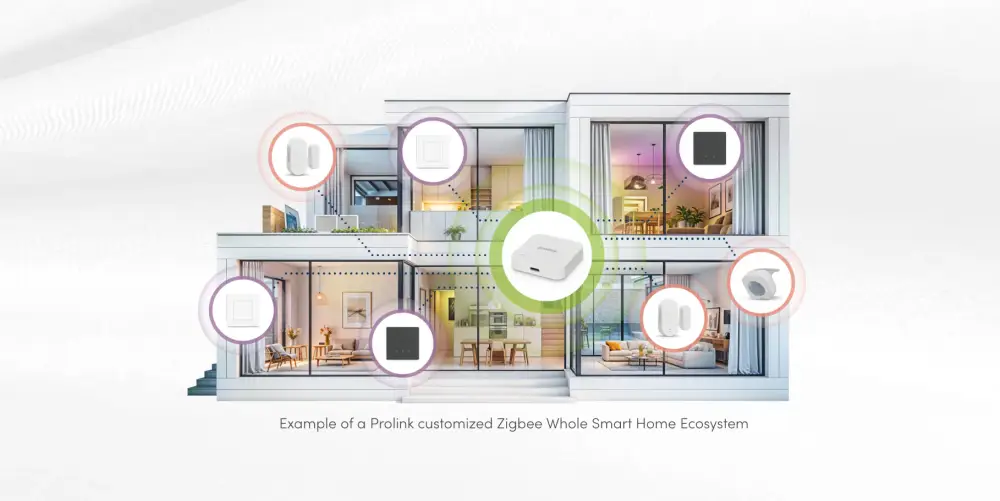
Introduction: Smart Home Ecosystem
For many homeowners, the idea of a smart home seems kinda expensive. People usually picture pricey automation systems, tangled wiring, and those high-end houses that are stuffed with tech.
But honestly, the reality is much more plain.
Right now, you can begin putting together a smart home with a modest budget and then add more gear as you go. No matter if your aim is stronger security, reduced electricity costs, nicer everyday comfort, or just straightforward convenience, affordable smart home tech makes automation reachable for almost everyone.
The trick is not grabbing everything all at once. The most sensible path is starting with the right base, picking devices that work together, and growing the setup in a careful way.
In this guide, you’ll see exactly how to build a smart home on a budget, without running into expensive missteps.
Why Build a Smart Home?
A smart home is more than a collection of gadgets.
Even simple automations can save time and make everyday life easier. When planned correctly, it can help you:
-
Control devices remotely
-
Improve home security
-
Reduce electricity consumption
-
Automate daily routines
-
Increase comfort and convenience
-
Monitor your home while travelling
Step 1: Define Your Goals First
Understanding your priorities prevents unnecessary spending. Before purchasing any smart device, ask yourself:
Do you want better security?
Consider:
-
Smart cameras
-
Video doorbells
-
Door and window sensors
Do you want energy savings?
Consider:
-
Smart lighting
-
Smart plugs
-
Energy monitoring devices
Do you want convenience?
Consider:
-
Voice assistants
-
Automated routines
-
Smart switches
Step 2: Build a Strong Wi-Fi Foundation
Your Wi-Fi network is the backbone of your smart home.
A reliable network ensures smooth communication between all smart devices. Many automation problems happen because of:
-
Weak signals
-
Poor router placement
-
Network congestion
-
Too many connected devices
If your home has Wi-Fi dead zones, consider:
-
A dual-band router
-
Wi-Fi 6 router
-
Mesh Wi-Fi system for larger homes
Step 3: Choose One Smart Home Ecosystem
One of the biggest mistakes beginners make is buying devices from different ecosystems that don't work together.
Choose one primary platform:
-
Google Home: Best for Android users and Google services.
-
Amazon Alexa: Excellent device compatibility and automation features.
-
Apple Home: Ideal for users already invested in the Apple ecosystem.
Step 4: Start with Smart Plugs
If you're new to home automation, smart plugs offer the highest value for the lowest investment.
They can automate:
-
Lamps
-
Fans
-
Coffee makers
-
Water heaters
-
TVs
-
Air coolers
Benefits include:
-
Remote control
-
Scheduling
-
Energy monitoring
-
Easy installation
Step 5: Upgrade to Smart Lighting
Lighting is often the first automation homeowners notice and enjoy.
Smart lighting improves both comfort and energy efficiency. Options include:
-
Smart Bulbs: Simple installation and ideal for renters.
-
Smart Switches: Better long-term solution for homeowners.
Benefits:
-
Voice control
-
Scheduled operation
-
Mood lighting
-
Movie mode
-
Night mode
Step 6: Add Voice Control
Popular options include Alexa and Google Assistant. Voice assistants become the command center of your smart home.
With a simple voice command, you can:
-
Turn lights on or off
-
Control appliances
-
Play music
-
Activate routines
-
Check device status
Step 7: Improve Home Security on a Budget
Even a basic security setup can significantly improve peace of mind. Home security is one of the most practical smart home upgrades.
Affordable options include:
-
Smart Cameras: Monitor your property remotely.
-
Video Doorbells: Receive alerts when someone approaches your door.
-
Smart Locks: Control access from anywhere.
-
Door and Window Sensors: Get instant notifications if a door or window opens unexpectedly.
Create Smart Automation Routines
Automation eliminates repetitive tasks and improves efficiency. The real power of a smart home is automation.
Good Morning Routine
-
Lights gradually turn on
-
Bedroom fan switches off
-
Favorite playlist starts
Leaving Home Routine
-
All lights switch off
-
Smart plugs turn off
-
Security cameras activate
Good Night Routine
-
Lights turn off
-
Doors lock
-
Security mode activates
Common Smart Home Mistakes to Avoid
-
Buying Random Devices: Always check compatibility before purchasing.
-
Ignoring Wi-Fi Quality: Poor networks cause most smart-home issues.
-
Choosing Extremely Cheap Products: Low-quality devices often fail and create frustration.
-
Skipping updates: Firmware updates improve security and performance.
-
Expanding Too Quickly: Build gradually and learn as you go.
DIY vs Professional Smart Home Installation
|
DIY Setup |
Professional Installation |
|
Lower cost |
Higher investment |
|
Easy to start |
Advanced integration |
|
Ideal for beginners |
Best for complete automation |
|
Limited scalability |
Highly scalable |
Future-Proof Your Smart Home
Technology evolves quickly. To avoid replacing devices later:
-
Choose Matter-Compatible Devices: Matter is becoming the universal smart home standard.
-
Focus on Scalability: Select products that can grow with your setup.
-
Keep Devices Updated: Regular firmware updates improve functionality and security.
-
Prioritize Compatibility: Ensure future devices can integrate with your ecosystem.
What Does a Budget Smart Home Cost?
Starter Setup
₹5,000 – ₹20,000
Includes:
-
Smart plugs
-
Smart bulbs
-
Voice assistant
Intermediate Setup
₹20,000 – ₹60,000
Includes:
-
Smart switches
-
Security cameras
-
Basic automation routines
Advanced Setup
₹60,000+
Includes:
-
Multiple rooms
-
Energy monitoring
-
Integrated automation
-
Smart security ecosystem
Why Choose Humtum World for Smart Home Solutions?
At Humtum World, we feel like smart living should be affordable, usable, and future-ready even if it sounds a bit, I don't know, “too easy." Whether you’re just beginning with smart plugs or you’re mapping out a fully automated home , Humtum World can guide you so you get the right setup for your budget and your day-to-day routine.
Our experts help homeowners:
-
Plan cost-effective automation
-
Select compatible devices
-
Improve home security
-
Optimize energy efficiency
-
Build scalable smart home systems
FAQs About Smart Home Ecosystem
1. Is it possible to build a smart home on a small budget?
Yes. You can begin with smart plugs, smart bulbs, and a voice assistant for a relatively low investment and expand over time.
2. What is the most important part of a smart home?
A reliable Wi-Fi network is the foundation of every successful smart home setup.
3. Which smart home ecosystem is best?
Google Home, Amazon Alexa, and Apple Home are all excellent choices. The best option depends on the devices you already use.
4. Are smart homes difficult to install?
Most beginner-friendly smart devices are designed for DIY installation and can be set up within minutes.
5. Do smart homes save electricity?
Yes. Smart lighting, smart plugs, and automation routines can significantly reduce unnecessary power consumption.
6. What is Matter in smart home technology?
Matter is a universal smart home standard that improves compatibility between devices from different manufacturers.
7. Is professional installation necessary?
Not always. Most basic smart home setups can be installed by homeowners. Professional installation becomes useful for larger and more advanced automation projects.
8. Can I upgrade my smart home later?
Absolutely. A properly planned smart home is designed to grow over time.